ERP Analytics with Microsoft Fabric: How Superbet Cut Audit Time by 75%
Gartner says AI projects without AI-ready data get abandoned. Here’s how Superbet built a clean ERP data foundation with Dynamics 365 and Microsoft Fabric.
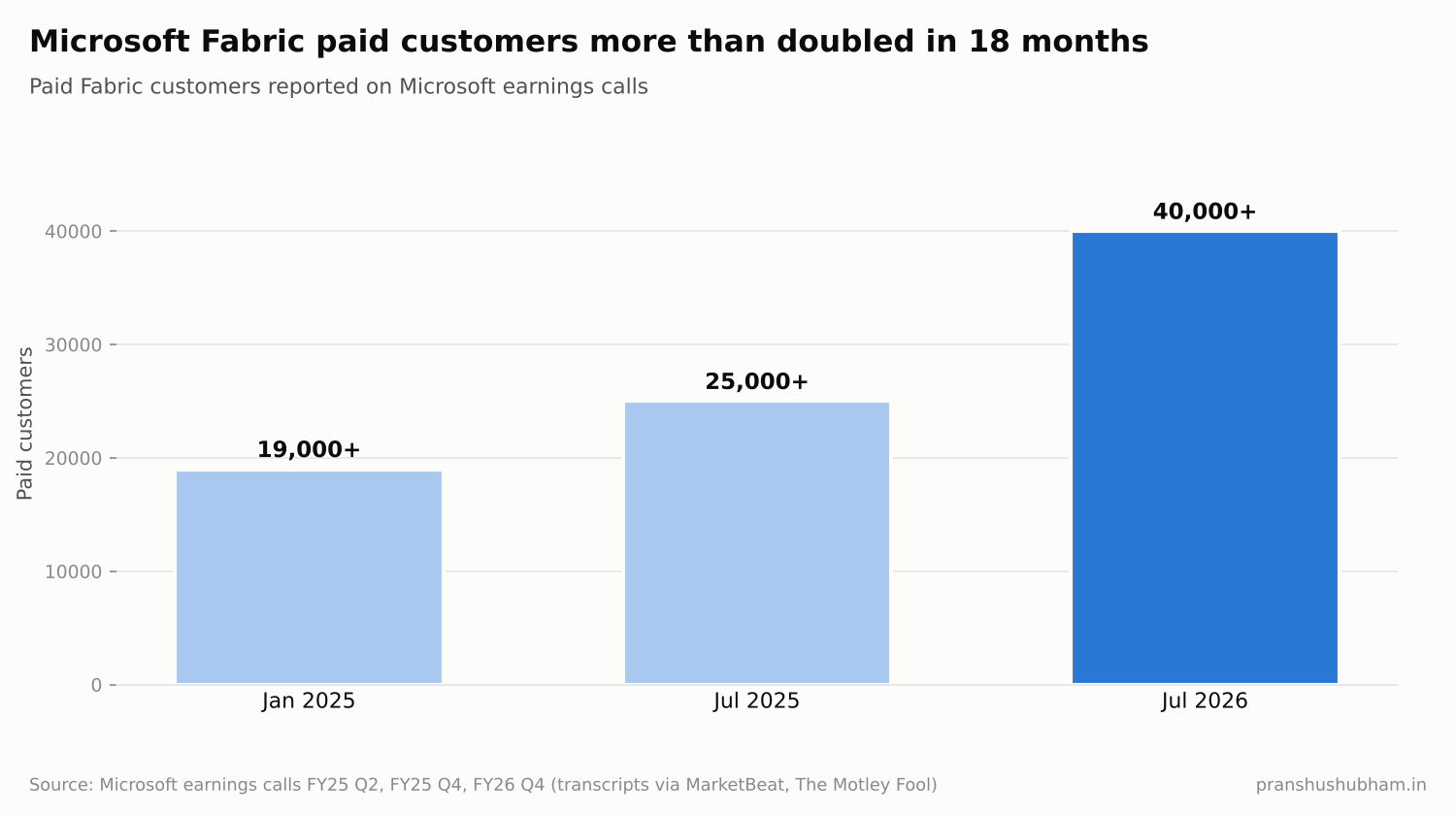
Microsoft Fabric paid customers chart
Every company wants AI on its ERP data. Very few have ERP data that’s ready for it.
Gartner put it bluntly in February 2025: 63% of organizations either don’t have, or aren’t sure they have, the right data management practices for AI. Gartner also predicts that through 2026, organizations will abandon 60% of AI projects unsupported by AI-ready data.
That’s why Microsoft Fabric has grown so fast. On Microsoft’s FY26 Q4 earnings call in July 2026, CEO Satya Nadella said Fabric had over 40,000 paid customers, up more than 60% year over year. A Forrester Total Economic Impact study commissioned by Microsoft found Fabric delivered 379% ROI over three years for its composite organization.
Case study: Superbet brings finance data together
Superbet, a betting and gaming company based in Romania, had a common multi-country problem: each country ran its own accounting software. Consolidation was slow, visibility was poor, and audits were heavy, including questions about who could access ERP financial data.
Superbet moved to Dynamics 365 Finance and Supply Chain Management, with Power Automate, and built its reporting on Microsoft Fabric with Power BI. According to Microsoft’s published customer story:
- Audit time dropped by more than 75%
- Reporting time fell by up to 75%
- User roles were reduced by nearly 77%
- User management went from over an hour a day to a few minutes
- The company saved nearly $70,000 a year
The access cleanup matters as much as the reporting. Fewer, cleaner roles meant auditors could see who had access to what, and that same clean data is what AI needs to be trusted.
How Fabric connects to Dynamics 365
Microsoft’s Fabric link for Dataverse lets you bring Dynamics 365 finance and operations data into Fabric. According to Microsoft Learn:
- There’s no need to export data or build ETL pipelines
- Low-latency sync handles up to 1 million or more records per hour per table for finance and operations tables
- Data lands in OneLake, ready for Power BI, SQL and AI workloads
In practice, this replaces the old pattern of nightly exports to a separate data warehouse with a near-real-time copy that analysts and AI can use directly.
Five steps to AI-ready ERP data
1. Start with the questions. List the 10 reports leadership asks for most. Build those in Fabric first.
2. Clean master data at the source. Fabric copies what’s in D365. Duplicate customers and inconsistent item codes need fixing in the ERP.
3. Agree on definitions. “Revenue”, “on-time delivery” and “inventory value” must mean one thing across countries.
4. Secure the analytics layer. Apply the same access discipline to Fabric that you apply to D365, as Superbet’s role cleanup shows.
5. Add AI last. Once the data is trusted, use Copilot and AI tools on top. Not before.
FAQ
What is Fabric link for Dynamics 365? It’s a Microsoft feature that links Dataverse, including Dynamics 365 finance and operations data, to Microsoft Fabric, without building export pipelines.
Do I still need a data warehouse with Dynamics 365? Many organizations now use Fabric as their analytics platform for D365 data, replacing separate warehouses and nightly exports.
The takeaway
AI on ERP is only as good as the data behind it. Superbet’s results show that a clean, connected data foundation pays off on its own, in faster audits and reports, before any AI is added.
I’m Pranshu Shubham, a D365 F&O Solution Architect who builds AI on top of ERP. If you’re planning analytics or AI on Dynamics 365 data, get in touch.