From Five Hours to 15 Minutes: What Planning Optimization Did for Lifetime Products
When MRP takes all night, you plan once a day and react late. Here’s how a US manufacturer cut planning runs to minutes, and why AI forecasting is next.
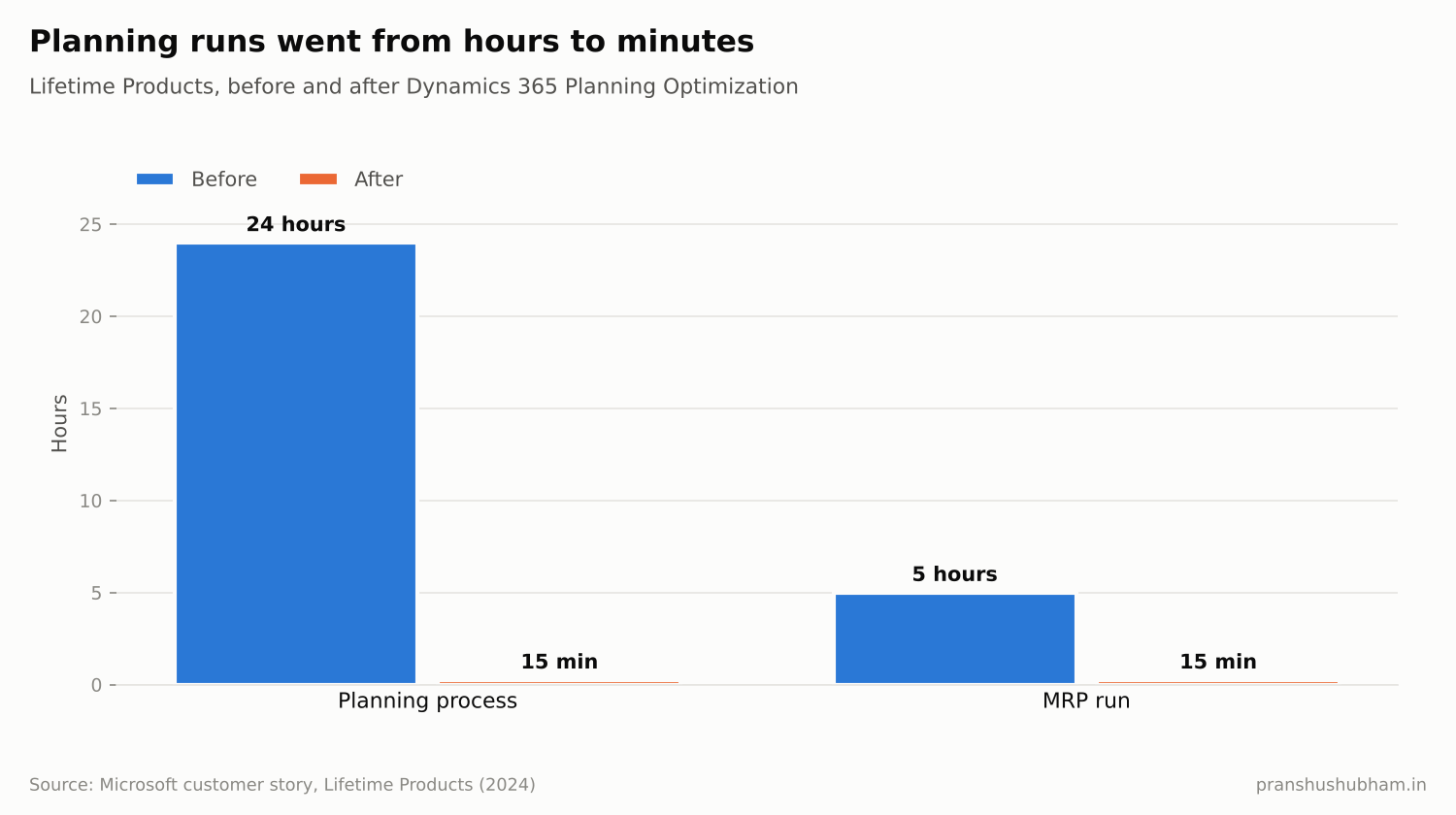
Planning run time before and after chart
In many factories, the master planning run is an overnight job. Planners arrive in the morning to a plan based on yesterday’s data, and spend the day working around everything that changed since.
When planning takes minutes instead of hours, that changes. You can re-plan after a big order lands, a supplier slips or a machine goes down, the same day.
Why fast, AI-driven planning is becoming standard
Gartner predicted in September 2025 that 70% of large organizations will adopt AI-based forecasting to predict future demand by 2030. Investment is already heavy: in a September 2026 survey of 243 organizations, Gartner found 83% had spent at least $3 million on automating supply chain planning.
But full automation is still far off. Gartner also predicts that by 2030, only 5% of organizations implementing planning automation will make at least 10% of their planning decisions autonomously. For now, the goal is faster, better-informed planners, not planner-free planning.
Case study: Lifetime Products
Lifetime Products, a Utah-based manufacturer of outdoor and recreational products, was running Dynamics AX 2012, which had become slow and complex. With partner Argano, it moved to Dynamics 365 Supply Chain Management and added the Planning Optimization add-in, alongside real-time EDI and the Warehouse Management mobile app.
According to Microsoft’s published customer story:
- A planning process that took essentially 24 hours now takes 15 minutes
- MRP runs went from an average of five hours to just 15 minutes
- Process efficiency rose from around 30% to around 40%, with a target of 80%
That’s the difference between planning once a day and planning whenever the business needs it.
What Planning Optimization is
Planning Optimization is Microsoft’s cloud-based master planning engine for Dynamics 365 Supply Chain Management. It’s now the standard: according to Microsoft Learn, the built-in master planning engine is deprecated and has been blocked for new deployments since version 10.0.41. Microsoft has promised 12 months’ notice before removing it completely.
If you’re still using the old engine, migration should be on your roadmap.
Planning Optimization also connects to demand planning in Supply Chain Management, which uses machine-learning forecasts that planners can adjust and test with what-if scenarios.
Five steps to faster planning
1. Migrate to Planning Optimization. Run the fit analysis Microsoft provides to find any features you use that need attention.
2. Clean your coverage settings. Item coverage, lead times and safety stock drive every planned order. Bad parameters give fast but wrong plans.
3. Plan more often. Once runs take minutes, schedule them several times a day or after key events.
4. Add AI forecasting gradually. Start with a product family with good history and compare the AI forecast with your current method.
5. Measure forecast accuracy and planner time. Track both before and after, by product group.
FAQ
What is Planning Optimization in Dynamics 365? It’s the cloud-based master planning engine for Dynamics 365 Supply Chain Management. It replaces the deprecated built-in engine and runs planning much faster.
Is the old master planning engine still supported? It’s deprecated and blocked for new deployments since version 10.0.41, according to Microsoft Learn. Existing users should plan their migration to Planning Optimization.
The takeaway
Fast planning isn’t about speed for its own sake. It lets planners respond the same day instead of the next morning. Lifetime Products shows the gain: hours down to minutes.
I’m Pranshu Shubham, a D365 F&O Solution Architect specializing in supply chain planning. If you’re moving to Planning Optimization or demand planning, get in touch.